Computational Speech
|
There are a lot of aspects to computational speech. One is speech recognition, where the computer recognises what you’re saying. There’s also the reverse, where software converts words (typed, or output from a program, or ...) to speech. And then there are AI systems which manage the speaker-system interaction, such as dialogue systems: this is the sort of software you get in telephone banking. A really good site with a lot of links is http://www.tiac.net/users/rwilcox/speech.html |
|
Speech recognition is a mainstream commercial application area now, so there aren’t as many free demos. You can try out a variety of dictation systems which let you run applications on your computer by voice commands. These just identify isolated words and use them as commands. Two sample ones are: · InCube You can also get a free toolkit for real speech recognition, which works on normal speech, but it requires a bit of installation. It’s from Carnegie Mellon University. There are also some telephony demos – you call up a phone number and have a dialogue with the system, making travel plans or doing banking. (You’ll have to dial the US for these.) Some of these are: · Nuance · Locus |
|
|
|
|
|
Probably the most widely used free text-to-speech (TTS) system is Festival, from Centre for Speech Technology Research at the University of Edinburgh. It’s part of a lot of applications that need computer-generated speech. There’s an online demo—you type in text, and it sends a .wav file back through the Windows Media Player—by the Centre for Spoken Language Understanding (CSLU) at the Oregon Graduate Institute. A commercial demo is available from AT&T Research. |
|
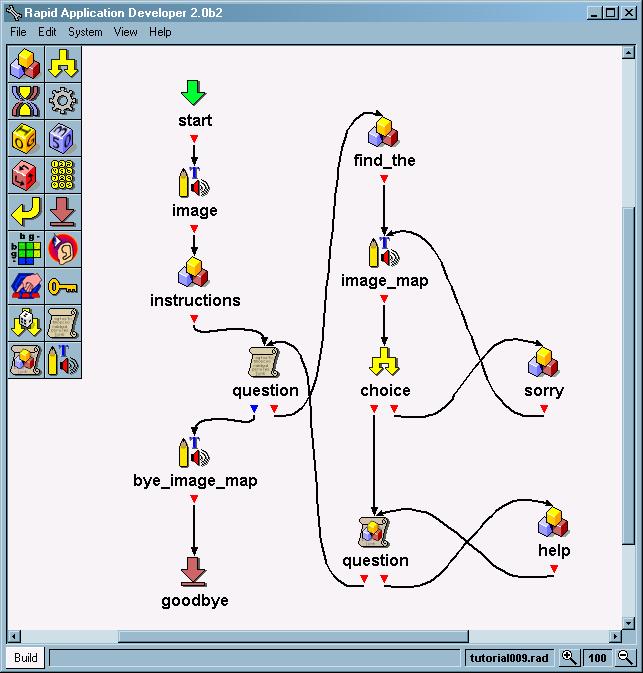
For a more flexible (and in depth) demo, you can download a Rapid Application Development package, again from CSLU. It’s GUI-based and drag-and-drop; you design your own dialogues, and it comes with its own speech recognition and speech synthesis software to turn it into a real application.
|